Adobe InDesign plugin

Enhance every placed image: without leaving InDesign

The Pixometry plugin for Adobe InDesign is a free UXP extension that processes placed images directly inside your document. Click Process once and Pixometry enhances your images, removes backgrounds, upscales low-resolution sources, and relinks the result — all in the resolution and colour space your layout actually needs.

Free plugin. Adobe Creative Cloud subscription required. Uses your Pixometry credits per image processed.

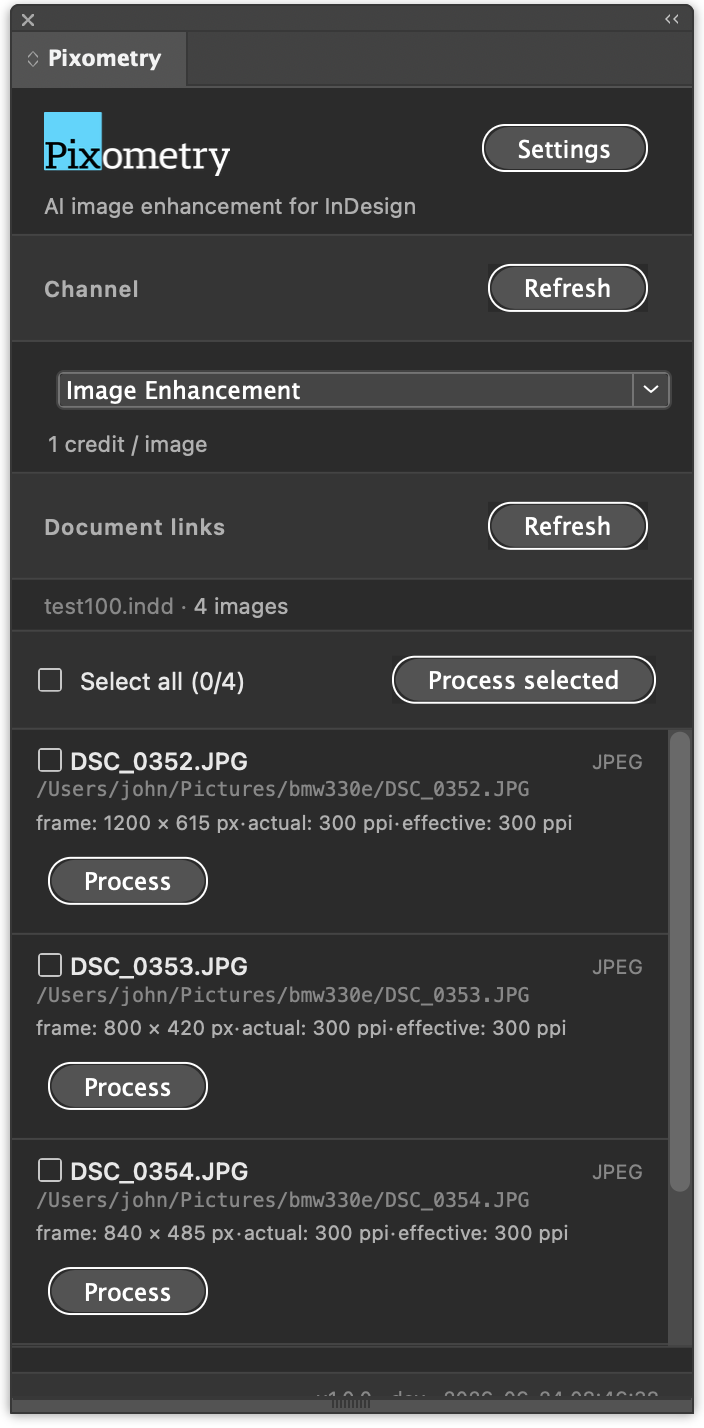
Pixometry panel inside InDesign, showing a list of placed images ready for processing

Why is preparing placed images so slow?

Every image in an Adobe InDesign layout has its own story, the right resolution for the frame, the right crop for the layout, the right colour space for the print run. Manually preparing dozens or hundreds of images through Photoshop before you can start typesetting eats hours out of every project.

Pixometry does it for you, image-by-image, at the exact size and quality each frame needs. Nothing more, nothing less.

Place. Click. Done.

How do I use the Pixometry InDesign plugin?

No round-trips to Photoshop. No renaming, no folder juggling, no lost source files.

1

Place your images

Design your layout as you always do. Photos can be full-resolution originals. Pixometry only processes the region visible in each frame.

2

Pick a channel

The Pixometry panel lists your configured channels: image enhancement, background removal, upscaling, or your own custom recipe. One click per image, or select all.

3

Click Process

Images are enhanced in the cloud and relinked automatically. Your document instantly shows the processed result at the right resolution.

Built for the way you actually work

Four things that make Pixometry more than "just another export script."

Frame-aware cropping

Pixometry reads the geometric bounds of each frame in InDesign, maps them back to your source image's actual pixels, and processes only the visible region, at the DPI your layout was designed for.

A 24-megapixel source used in a 50 × 40 mm frame at 300 DPI comes out as a razor-sharp 591 × 472 px image, not the entire 24 MP that InDesign would otherwise carry around.

Source image
Frame in InDesign
Only visible pixels processed

Every image, one click

The panel lists every placed raster image in your document. Process one, process the batch, or reprocess just the ones you changed. The plugin tracks which frames have already been processed so you never redo work you didn't need to.

InDesign document with the Pixometry panel showing multiple images ready to process

Beyond enhancement

The same panel drives every Pixometry capability: background removal with pixel-accurate masks, AI upscaling for low-resolution sources, and full colour management for CMYK, AdobeRGB, sRGB and custom ICC profiles, all in a single workflow.

Sending web-sourced photography to print? Pixometry upscales small originals with detail intact, then converts to your target colour space in the same pass.

Image enhancement
Background removal
AI upscaling
Colour management

Non-destructive by default

Your source files are never touched. Processed results are saved alongside as new files, and a click on Show original instantly relinks back to the untouched source. Experiment freely.

Processed
Original

One click to switch, for every image, or just one.

How do I install the Pixometry InDesign plugin?

Free plugin, free trial account, try it on a real document before you commit.

Step 1

Install the plugin

Available on Adobe Exchange for InDesign 2024 and later, macOS and Windows. Free.

Adobe Exchange
Step 2

Create a Pixometry account

Sign up with your work email. You get 50 credits (about 50 processed images) to try things out, no card required.

Free account
Step 3

Connect the plugin

In your Pixometry dashboard, generate an API key. Paste it into the plugin's Settings tab. That's the whole setup.

Where to find the key

Publishing 1,000+ images a day?

Newspapers, magazines and catalogue publishers use Pixometry at scale: thousands of images per issue, custom channels per publication, and volume pricing that beats per-credit rates. Talk to us about an enterprise contract.

Contact sales

Frequently asked questions

Which InDesign versions does the plugin support?

The Pixometry plugin requires Adobe InDesign 19.0 (2024) or later, on macOS or Windows. It runs on Adobe's modern UXP plugin platform, so one plugin works across all supported InDesign versions without needing a per-version rebuild.

Do I need a separate account for the plugin?

No. The plugin uses the same Pixometry account as the web app. If you don't have an account yet, you can sign up during first-time plugin setup — the free trial's 50 credits work through the plugin identically.

Can the plugin process multiple images at once?

Yes. Select multiple images in your InDesign document, click Process, and the plugin uploads them in parallel and relinks each one as it completes. Cropping, output DPI, and channel settings can be applied per image or in batch.

What happens to my images when I use the plugin?

Your source image is uploaded to Pixometry's EU-hosted infrastructure (AWS eu-west-1, Ireland), processed, downloaded back to your machine, and the relinked result replaces the original in your InDesign document. Uploaded files are deleted from our servers after 24 hours; nothing is used to train AI models.

How do I install the plugin?

Install from Adobe Exchange (search "Pixometry" in the Creative Cloud desktop app → Discover → Plugins) or download the .ccx directly from pixometry.com/indesign. Once installed, open Window → Extensions → Pixometry in InDesign, paste your API key from your account settings, and you're ready.

Does the plugin work offline?

No. Pixometry is a cloud-based service by design — image processing happens on our GPU servers, not on your local machine. Your images stay high-quality regardless of your Mac or PC's specs, but you need an internet connection to process. Placed image previews inside InDesign continue to work offline; only the Process action requires connectivity.